For every business, in every industry

Watch Tower - Applied Intelligence
for your Business.

Watch Tower is an Applied Intelligence console that helps business owners and operators see their whole business in one place, protect the plan and choose where to grow, built with the people who do the work.

In your first four weeks we set your business up in your own Watch Tower Console with you: your team added, your goals and KPIs set, your assets registered and on one map, and a work tracker your people use every week. Then we stay, and review it with you every week.

Rise above the chaos now
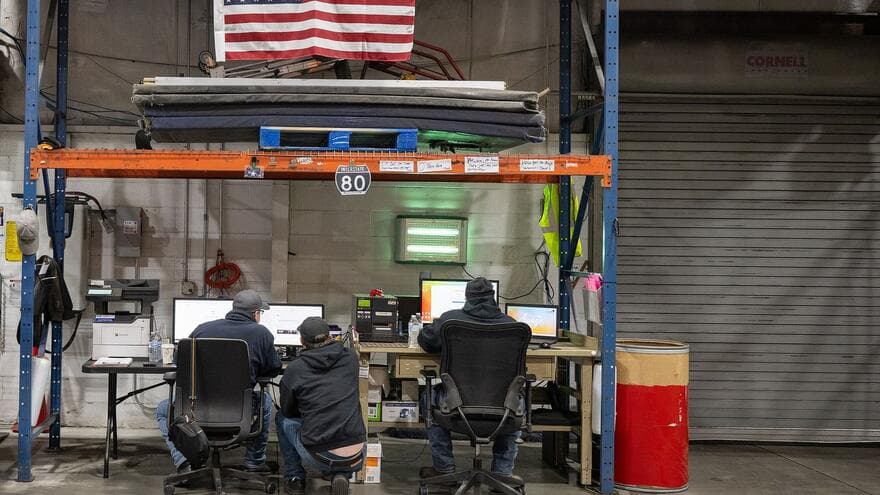
Three staff members work at computer desks set up under the storage racks of a food bank warehouse in central Pennsylvania.
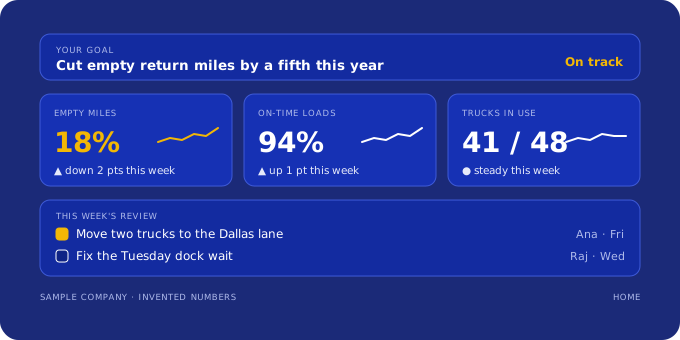
Your Console · HomeAn illustration of the Watch Tower Console's Home with sample data: the goal, three KPI cards with their trend and this week's review.

Photo: U.S. Department of Agriculture (cropped) · Public domain

  1. Week 1Team added, records in
  2. Week 2Goals and KPIs set
  3. Week 3Assets on the map
  4. Week 4Work tracker running, first brief

Then a weekly review with you, every week you keep the plan. Week by week, in detail · What you provide · After you pay · Want a partner to set it up?

01 Start from your goal02 Build it with the people who do the work03 Stay until it runs every week

What you see in the Console

One workspace for the goal, the map, the work and the answers.

The Talos map is a real screen from the free demo; the rest are drawings with sample data. Your workspace opens the same way, with your own records.

  • An illustration of the Watch Tower Console's Home with sample data: the goal, three KPI cards with their trend and this week's review.
    01

    Home

    Your goal, the KPIs that show it and this week's review, on the first screen you open.
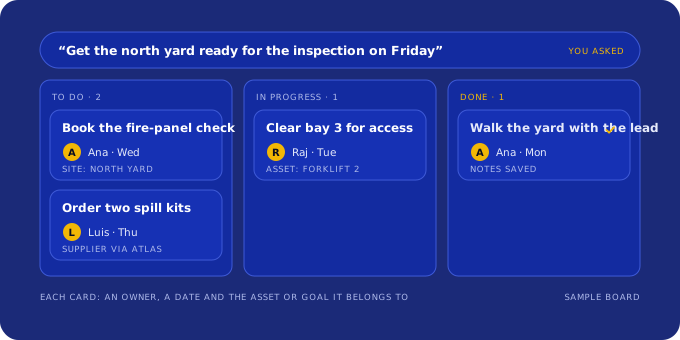
  • An illustration of the Work Tracker with sample data: one request turned into cards in To do, In progress and Done, each with an owner and a date.
    02

    Work Tracker

    Tell it what you want done this week; you get cards with an owner, a date and a next step.
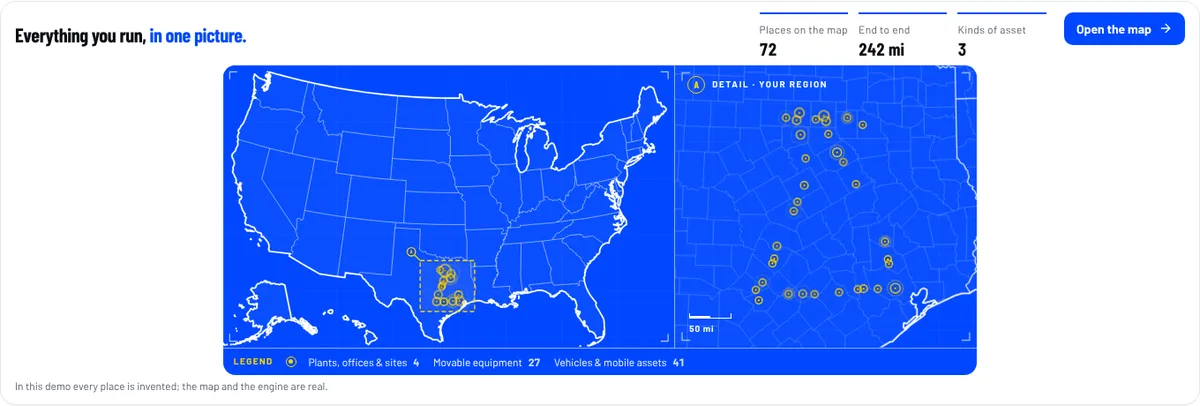
  • The Talos map on the Watch Tower Console's Home: a fictional trucking company's 72 places pinned across Texas on a map of the United States, with a close-up of the region.
    03

    Talos map

    Every site, vehicle and machine on one map of the United States, with your region up close.
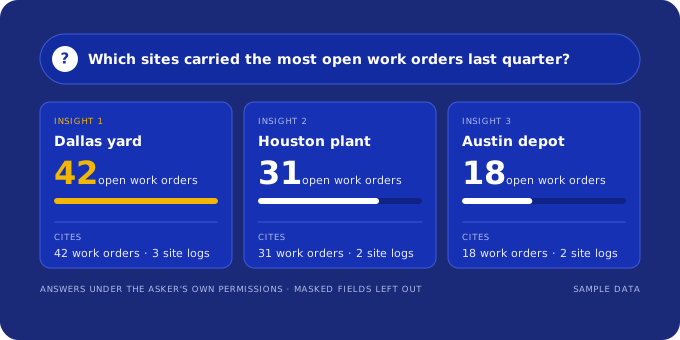
  • An illustration of Bifrost with sample data: a plain question answered with three insight cards, each citing its records.
    04

    Bifrost

    Questions about your own records, answered with how each number was worked out.
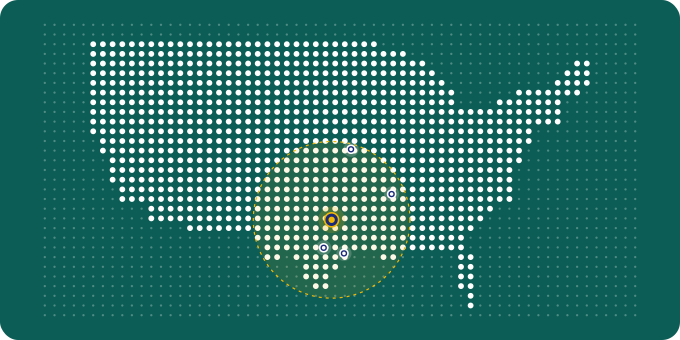
  • An illustration of Atlas: suppliers that deliver around one Dallas site, on a dotted map of the United States.
    05

    Atlas

    Suppliers and field partners we have checked, for the tools and work your plan needs.

Sample data: every company, place and number here is invented. Open the demo yourself

How Watch Tower works

Five questions stand between your business and AI that works. We answer them with you.

AI put to work inside a system, with a team behind it, until it pays off every day. AI is one of five pieces. A blue tile shows a piece doing the work for that question.

The five barriers, across, and the five pieces of Applied Intelligence, down. A dot marks a piece Watch Tower uses to cross that barrier.
Piece
01Intent
02Use
03Ecosystem
04Capability
05Consistency
AIBifrost answers questions about your own records, inside your workspace.
TeamAdi works with your owner and the people who do the work, online; partner-deployed plans add hands-on setup.
System designGoals, KPIs, the asset register, the map and the work tracker connected in one workspace, so each action has an owner and a number.
CurationA few KPIs and records that matter, chosen with you, and the rest left out. Forge toolkits where a calculation helps.
Customer successA weekly review with you, and we stay after week 4 for as long as you keep the plan.
  1. 01 · Intent

    Why do I need AI at all?

    We start from the one goal that matters most to you this quarter, and write down the number that shows it.

  2. 02 · Use

    What exactly would I use it for?

    We name the first jobs: the KPIs to watch, the cards on the work tracker, and the questions Bifrost answers from your records.

  3. 03 · Ecosystem

    Are people like me using it, and is it working for them?

    We build it with the people who do the work, and show worked examples for your industry, built on demo companies like yours.

  4. 04 · Capability

    How do I use it, what do I install, and who do I call?

    We set it up with you, register your assets on one map, and stay one email away.

  5. 05 · Consistency

    Will this still be useful next week?

    The work tracker and a weekly review with you keep it running after week 4.

See how the first four weeks do this

What you get, week by week

Four weeks from first payment to a business that runs on one picture.

Each week ends with something you can open in your own workspace. Each one names the Applied Intelligence piece it builds and the barrier it helps you cross.
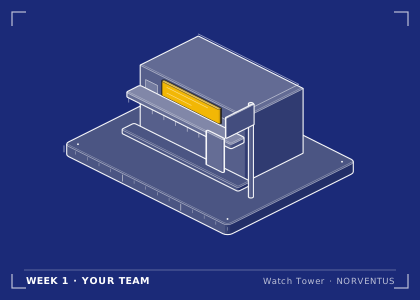
  1. Blueprint drawing of a storefront: the company and its team, set up in week 1.
    Week 1

    Your team and your starting point

    • Your workspace opens and your team is added, each person with the access their role needs.
    • A 60-minute online kickoff with Adi: the one goal that matters most this quarter, in your words.
    • Your first records taken in (spreadsheets, or exports from your TMS, ELD, ERP or job-cost system), with a written list of what is there and what is missing.

    You: Name one owner, send the team list and the records you have, and join the kickoff.

    Team · crosses Intent
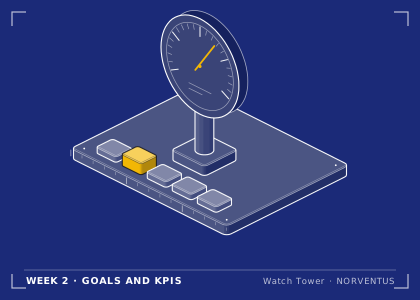
  2. Blueprint drawing of a dial gauge with one needle: the goal and its KPI, set in week 2.
    Week 2

    Goals and KPIs

    • Three to five goals agreed with you, each with one KPI.
    • Every KPI written out: its definition, the record it comes from, the period, where it stands today, and the assumptions behind the number.
    • Guardrails: the numbers that must not get worse while you work on the goal.

    You: Review the goals and KPIs with us and correct anything that doesn't match how the work really runs.

    System design + Curation · crosses Use
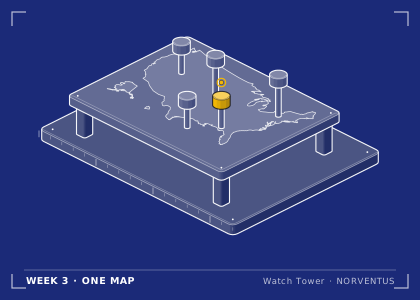
  3. Blueprint drawing of a map table with pins on it: every site and asset on one map, in week 3.
    Week 3

    Assets registered, on one map

    • Your sites, vehicles, equipment and people in the Vulcan asset register, imported from your files.
    • Talos Base: your business on one US map, with its sites, assets and boundaries.
    • Your organization chart, so every asset and KPI has an owner.

    You: Check the register and the map, and tell us what's wrong or missing.

    System design + Curation · crosses Capability
  4. Blueprint drawing of a week planner with five day tiles, the last one lit: the work running and reviewed each week from week 4.
    Week 4

    The work runs, and your first brief

    • The work tracker running: each action behind a goal is a card with an owner, a due date and the assets it touches.
    • Bifrost answers your team's questions about your own records.
    • Your first brief: goals, KPIs with their assumptions, options with guardrails, and a 30-day agenda (see the sample).
    • The first weekly review, at a time we agree, which carries on every week after.

    You: Hold the first weekly review with us and move the first cards.

    AI + Customer success · crosses Consistency

The work tracker is the newest part of the Console. If it hasn't reached your workspace by week 4, we keep the same cards with you in your weekly brief and move them in when it arrives.

An example deliverable

See the brief for your industry before you pay.

Four sample briefs, each built by the same generator your workspace uses, from a fictional demo company's records: the biggest findings with every input next to the number, the KPI board, and a 30-day plan that says what we, our team and you each do.

All four samples on one page · How a week-4 brief reads its KPIs

Where this goes

Start with one goal. End with your whole business on one map.

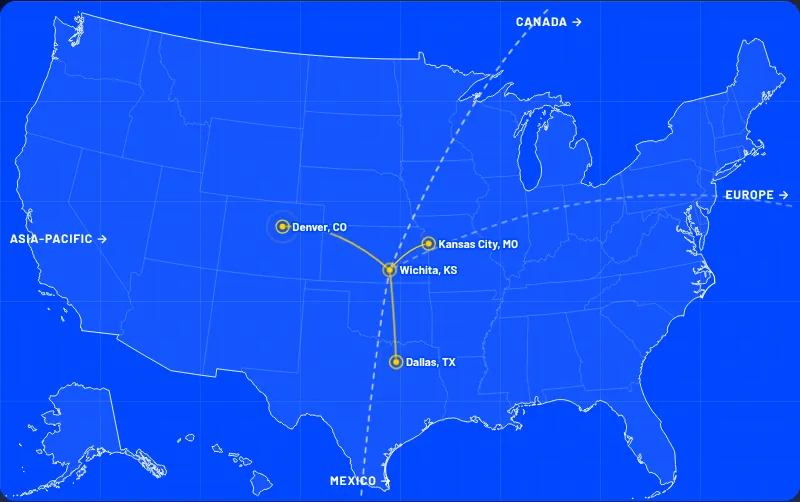
Week 3 puts every site, vehicle and machine you run on one map of the United States. From then on, each goal, KPI and card on the work tracker ties back to a place on it, so the weekly review starts from one picture.
  • One goal and the number that shows it
  • Every site and asset on one map
  • A weekly review that keeps it running
A blueprint map of the United States with an example company's four places in Kansas, Missouri, Texas and Colorado pinned in yellow and joined by lines.
From the demo: every place is invented; the map and the engine are real.

What you provide

Your part is small, and it matters.

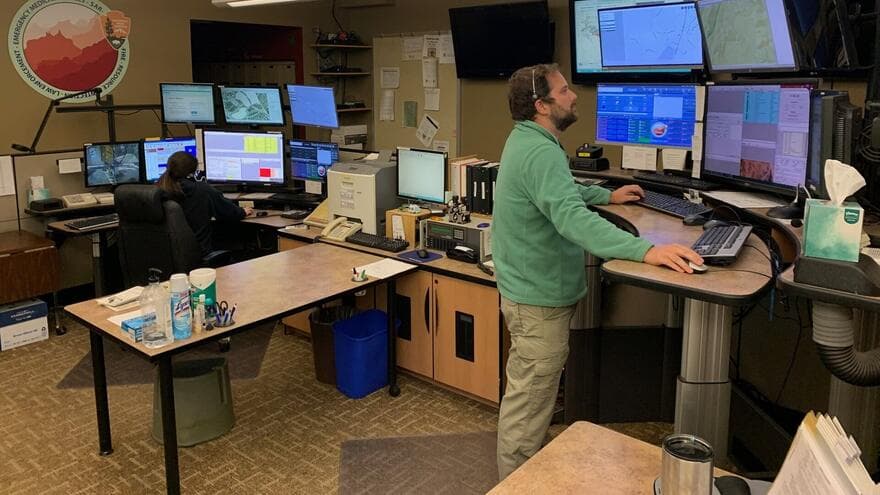
Two dispatchers work at desks lined with monitors and maps at a regional communications center in Arizona.

Photo: Grand Canyon National Park (cropped) · Public domain

You provide one owner, your goal and the records you already keep. We do the setup with you, and you can see a sample of what you get before you pay.

  • One owner on your side, with about two hours a week for the first four weeks.
  • The one goal or decision that matters most this quarter.
  • The names and work emails of the people to add.
  • The records you already keep: a spreadsheet of sites, assets and people is enough to start; TMS, ELD, ERP or job-cost exports if you have them.
  • Your approval of what we may process, before we import anything.

What happens after you pay

From order to week 1.

  1. When you order

    Pick a plan on /pricing and press Buy now. We ask for your name, work email and company.

  2. Within 1 working day

    Adi, COO at Norventus, emails your invoice.

  3. When you pay

    Your own workspace opens at once, with sample data to explore, and Adi emails within one working day to book the week-1 kickoff. Your own records go in as soon as you approve, in writing, what we may process.

  4. Weeks 1 to 4

    We set it up with you, week by week, as above.

  5. From month two

    The monthly plan carries on with the weekly review. Cancel the monthly plan any time.

Your plan · Know your business

Everyone starts on the Watch Tower plan. Here is what it opens.

Know your business is the first plan on the plans page and covers the four weeks above. The first payment opens your own Watch Tower Console workspace at once and covers the first month; a monthly fee follows from month two, and you can cancel the monthly plan any time. Every price is on the plans page, where you order.

What the Watch Tower plan opens

  • Your own Watch Tower Console workspace, open the moment the first payment is in, with sample data to explore until you approve in writing what we may process. The first payment covers the first month; a monthly fee follows from month two
  • The four Know your business steps, which are weeks 1 to 4 above: your starting point, the goals and KPIs, mapping your assets, and the work running
  • Vulcan: your asset register, organization chart and bulk import
  • Talos Base: your business on one US map, with its sites, assets and boundaries
  • Bifrost Basic: AI that answers questions about your own records
  • Nimbus: access, the audit trail, and changes and releases

What you choose

  • The plan: Know your business, Know + Protect, Know + Grow, Know, Protect and Grow, or Max. Know your business is where everyone starts and opens the moment you pay; the larger plans are set up by hand, on request, while we finish them in the Console
  • Self-deployed, with our guides and the weekly online review, or partner-deployed, with hands-on setup: today by our own team with you online, and by deployment partners as they sign on
  • Hardware, where you need it, is quoted separately

Know your business on its own doesn't open the Protect the plan and Grow with control stages, the higher Bifrost tiers or the Talos layers above Talos Base; they stay locked, and you can ask for them any time. No plan promises a financial result.

Want a partner to set it up? Partner-deployed plans add hands-on setup: today our own team does it with you online, and deployment partners, such as accounting firms, ERP resellers and IT providers, join as they sign on. Your own adviser can become one. How deployment partners work

  • Meetings are online, at times we agree with you in your time zone. Our team works from India, so we confirm the hours we can meet.
  • Your contact throughout is Adi, COO at Norventus, at adi@norventus.com.
  • For your finance team: the invoice comes from Speedloop Auto Private Limited (India), in US dollars. If your accounts-payable team needs anything else to set us up as a vendor, ask before you pay and we'll answer in writing.
  • Payment terms are the ones on your order and invoice; see section 5 of the refund and cancellation policy.

See plans and order

Ask us which plan fits your goal

Inside your workspace

Four parts of the Watch Tower Console you will use.

Every plan includes all four; larger plans add higher Bifrost tiers and more Talos layers. The plans page shows what each plan opens.

Vulcan logo

Vulcan

Your asset register

Sites, vehicles, equipment and people, imported from your files, each with an owner.

Talos logo

Talos

Your business on one map

Every site and asset on one US map; the work tracker lives here too.

Bifrost logo

Bifrost

AI on your own records

Ask questions about your own records in plain words and get answers you can check.

Nimbus logo

Nimbus

Access and audit

Who can see what, the audit trail, and the changes we ship to your workspace.

Who we are

A partner that stays until it works every week.

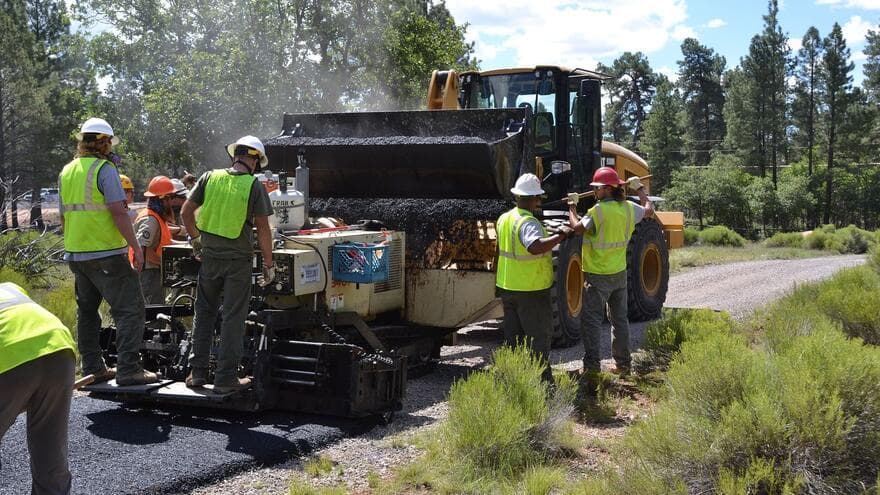
A crew in hard hats and safety vests works beside a paving machine as a front loader refills it with asphalt in Arizona.

Photo: Grand Canyon National Park (cropped) · CC BY 2.0

We work with your owner and the people who do the work. We set up the system, choose the few tools and numbers that matter, and keep reviewing it with you after the first four weeks.

What you get

  • A workspace set up with you, week by week
  • Numbers that show their assumptions
  • A weekly review that keeps going

What we are not

  • A data broker
  • A dashboard handed over and left
  • A software license with no one to call

Who you'll work with

Your work is led by Adi, COO at Norventus. Write to Adi at adi@norventus.com, before you buy and throughout the work.

Why there is no past work to show yet

We are new. Watch Tower hasn't finished a customer engagement yet, so there are no client stories, quotes, logos or results on this page, and we won't invent any. Instead, here is exactly what you get: the four weeks above, the sample brief built from demo data, and the Trust center, which says what we don't claim yet.

Who you are dealing with

norventus

Norventus is a U.S.-focused offering of Speedloop Auto Private Limited, India, which issues the invoice and signs the proposal. The speedlooptech.app and speedloopauto.com addresses are both ours.

For supply partners

Bring the field capability. Help customers make better decisions.

A long row of container cranes lines the waterfront at the Port of Oakland in California.

Photo: Ingrid Taylar (cropped) · CC BY 2.0

Atlas is Watch Tower's supplier directory. We are building it with equipment, tracking, materials, logistics, installation and service providers in our first U.S. markets. Partners may supply the tools and field work a customer needs, and may introduce customers to Watch Tower.

Join Atlas

Listings, referrals and commercial terms require individual review and agreement.

Start from your goal

What should your business be better at four weeks from now?

Tell us the goal. We'll reply with the plan that fits it and what your first four weeks would look like.

See plans and order

Or tell us your goal first

Or write directly to customers@norventus.com

How we handle your data: Trust center

Founders

The people you will talk to.

Write to either of us directly. For sales and support, write to customers@norventus.com.

  • Gayatri Jadhav, Co-founder and CEO of Norventus

    Co-founder and CEO

    Gayatri Jadhav

    • Leads Norventus: strategy, customers, operations and partnerships.
    • Co-founded Speedloop Auto in 2020 and runs it as CEO. It builds electric cargo vehicles, now approved for use by large e-commerce companies and the Government of Maharashtra.
    • Earlier, Ashok Leyland.
  • Hanuma Aditya Puppala, Co-founder and COO of Norventus

    Co-founder and COO

    Hanuma Aditya Puppala

    • Runs operations at Norventus and builds Watch Tower, Forge and Beacon with the team.
    • Co-founded Speedloop Auto in 2020 and leads it as CTO: product architecture, platform engineering and certification, including ARAI certification of India's first certified reverse trike.
    • Earlier, Ashok Leyland.

Norventus

Applied Intelligence, three ways.

One way of thinking, built for three different jobs. Here is how they compare.

  • Applied Intelligence

    Watch TowerFor Business

    Who it is for
    Leaders and operators of an organization.
    What you get
    Your team, goals and KPIs, assets on one map and a work tracker, set up with you in the Watch Tower Console in four weeks, then reviewed with you every week.
    How to start
    Start from your goal. The demo is free.
    You are here
  • Applied Intelligence

    BeaconFor Professionals

    Who it is for
    One professional and where their career goes next.
    What you get
    A personal career console: news for your role, certifications, a pay-target planner, lessons and projects.
    How to start
    3 days free. No card needed to start.
    Visit Beacon
  • Applied Intelligence

    ForgeFor your Work

    Who it is for
    The people who do the work, on site (Crew) or at a desk (Labs).
    What you get
    Small, clear tools for everyday jobs: calculators, quick references and checklists.
    How to start
    Many tools are free. No account needed.
    Visit Forge