- Industries
- General contractors
- Work tracker
Watch Tower · Applied Intelligence for your Business · General contractors
A work tracker for general contractors
The goal: Finish jobs on schedule and on budget, with every crew working safely and every piece of equipment where it's needed.
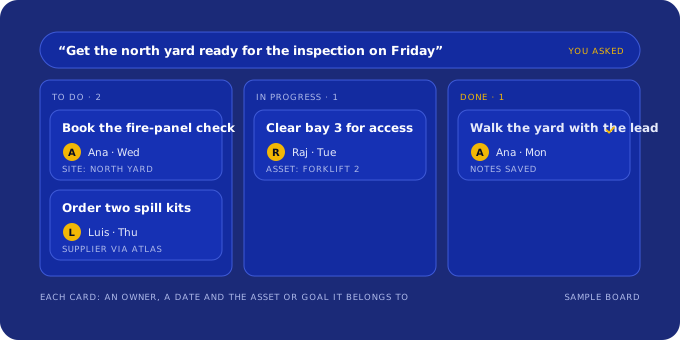
Say what has to get done this week and the work tracker turns it into cards: one owner each, a due date, the truck, site or machine it touches, and the goal it moves. Your team moves the cards; the weekly review reads them.
What you see
Work Tracker in the Watch Tower Console
For owners, project managers and safety leads at general contracting firms
What it looks like for general contractors
The KPIs, cards and questions below are examples of what we set up with you. The names and units are made up.
KPIs, with the assumption behind each
Cards on the work tracker
- Get the competent person's scaffold check logged before Monday's shiftSite superintendent · due Mon · Job: Riverside clinic
- Return the idle rented excavator or move it to the next jobEquipment manager · due Wed · Excavator R-12
- Update the cost to complete after the steel change orderProject manager · due Fri · Job: Elm Street retail
Records you already keep
- Job-cost reports
- Daily logs and inspection checklists
- Equipment lists and rental agreements
- Subcontractor schedules
Assets in the register
- Job sites
- Owned and rented equipment
- Crews and foremen
- Subcontractors
Questions your team can ask Bifrost
- Which jobs are behind their baseline, and by how many days?
- Which rented equipment sat idle for more than five days last month?
- How many shifts started without a logged scaffold check this quarter?
Bifrost answers from the records in your own workspace and shows how each number was worked out.
How it runs
Work tracker, step by step
- Tell us the goal that matters most this quarter, in your words.
- We set up the board with you: your people, your assets and the recurring jobs you already run.
- Each action becomes a card with one owner, a due date and the assets it touches.
- Every week we review the board with you: what moved, what slipped and what's next.
The barriers this crosses
- Use: What exactly would I use it for? We name the specific uses by role and by industry: the decision, the calculation, the plan, the brief.
- Consistency: Will this still be useful next week? We design AI into the daily system: the Console, the toolkits and the career plan people come back to, with customer success that follows up.
Rules and facts for general contractors
What the records have to show
- Each employee on a walking or working surface with an unprotected side or edge six feet or more above a lower level must be protected from falling by a guardrail, safety net or personal fall arrest system.Source: 29 CFR 1926.501(b)(1), Duty to have fall protection
- Scaffolds and their components must be inspected for visible defects by a competent person before each work shift.Source: 29 CFR 1926.451(f)(3), Scaffolds
- OSHA's "Focus Four" construction hazards are falls, caught-in or -between, struck-by and electrocution.Source: OSHA, Construction Focus Four training
A summary for planning work, not legal advice. Check the source for the full rule and any state requirements.
Start
See it on a sample company first
Founding 10
$2,000 for setup and the first 3 months of Watch Tower, then $250/month. Ten places. We set up your team, goals and KPIs, asset register, map and work tracker with you, then review it with you every week.
Hardware implementation is quoted separately. Start with the demo; you can order from inside it.Open the free demoQuestions
Common questions
Does this replace our construction management software?
No. It reads your job-cost reports, logs and equipment lists and puts the goals, the actions and the weekly review in one place. Keep the tools your field team already uses.
Is this another project-management app my crew has to learn?
No. The tracker holds only the actions behind the goals you set with us, each tied to a person and an asset you already have. We add your team, set up the first cards with you and review the board every week, so nobody has to build it alone.
Can cards come from what we already track in spreadsheets?
Yes. In week 1 we take in the spreadsheets or system exports you already keep and turn the recurring jobs in them into cards, with a written list of what was there and what was missing.
What does Watch Tower cost for general contractors?
Founding 10 covers setup and the first 3 months in one payment, then a monthly price; the numbers are on this page and on the pricing page inside the demo. Hardware implementation is quoted separately.
More
More for general contractors
- An asset register and map for general contractors
- Goals and KPIs for general contractors, with the assumptions written down
- A weekly operations brief for general contractors
- Everything for general contractors
- Read a sample week-4 brief
Work tracker in other industries
- Work tracker for trucking companies
- Work tracker for freight brokers
- Work tracker for 3PL warehouses
- Work tracker for cold-chain and reefer carriers
- Work tracker for HVAC contractors
- Work tracker for electrical contractors
- Work tracker for excavation and sitework contractors
- Work tracker for farms and agribusinesses
- Work tracker for cattle ranches and feedlots
- Work tracker for food and beverage processors